Press Enter to skip to the main content
Catalog Degrees Visit Apply
Give Blinn A-Z Calendars myBLINN
Blinn College For Mobile Devices
  • About
    • About
    • Administration
    • Accreditation
    • Affordability
    • Blinn A-Z
    • Board of Trustees
    • Campuses
    • Campus Maps
    • Catalog
    • Chancellor
    • Contact Blinn
    • Directory
    • Economic Impact
    • Employment Opportunities
    • Institutional Research and Effectiveness
    • Newsroom
  • Student Services
    • Student Services
    • Academic Advising
    • Activities Calendar
    • Business Office/Payment
    • Campus Safety
    • Career Services
    • Counseling Services
    • Disability Services
    • Financial Aid
    • Graduation Information
    • Housing and Residence Life (Brenham Campus)
    • Health Clinics
    • Meal Plans
    • Pregnancy and Parenting Services
    • Police and Emergency Management
    • Scholarships
    • Student Leadership/Activities
    • Title IX
    • Transcripts
    • Veteran Services
  • Future Students
    • Future Students
    • Academic Advising
    • Admissions
    • Application Steps
    • Contact a Recruiter
    • Course Registration
    • Housing and Residence Life
    • Immunization Information
    • Important Dates and Deadlines
    • International Students
    • New Student Registration
    • Placement Testing
    • Preview Day
    • Residency
    • Visit
  • Blinn College For Desktop Devices
  • Programs
    • Programs
    • Academic Affairs
    • Academic Calendar
    • Applied Technology and Workforce
    • Blinn Online
    • Catalog
    • Course Schedule
    • Dual Credit
    • ICLCs
    • Instructional Leadership
    • Programs A-Z
    • Transfer Information
  • Academic Resources
    • Academic Resources
    • Bookstore
    • Ecampus
    • Learning Center
    • Library
    • myBLINN
    • Testing Services
    • Tutoring Services
    • Writing Center
  • Community
    • Community
    • Alumni and Friends Association
    • Alumni Lettermen Association
    • Athletics
    • Blinn College Foundation
    • Box Office
    • Performing Arts Series
    • Rent Event Spaces
    • Small Business Development Center
    • Star of the Republic Museum
    • Visual and Performing Arts
  • Academic Technology Home
  • Removing Old Profile Due to Updated Certification
  • Remove old profile from Mac OS
  • Student Wi-Fi for Chromebook
  • Student Wi-Fi for MS Windows
  • Student Wi-Fi for Apple OS X
  • Student Wi-Fi for iPhone, iPad
  • Student Wi-Fi for Android
  • eduroam
  • Duo Multi-Factor Authentication
Academic Technology Home Removing Old Profile Due to Updated Certification Remove old profile from Mac OS Student Wi-Fi for Chromebook Student Wi-Fi for MS Windows Student Wi-Fi for Apple OS X Student Wi-Fi for iPhone, iPad Student Wi-Fi for Android eduroam Duo Multi-Factor Authentication

Remove old profile from Mac OS

If you were a student in a previous semester or who installed eduroam before August 26, 2026 and are having issue connecting to eduroam. Your device could have an old security certification. This will require that you first remove the eduroam profile and then re-install eduroam on your device to receive the new certification.

Please follow the instructions to delete your old profile and re-install eduroam with the new certificate.
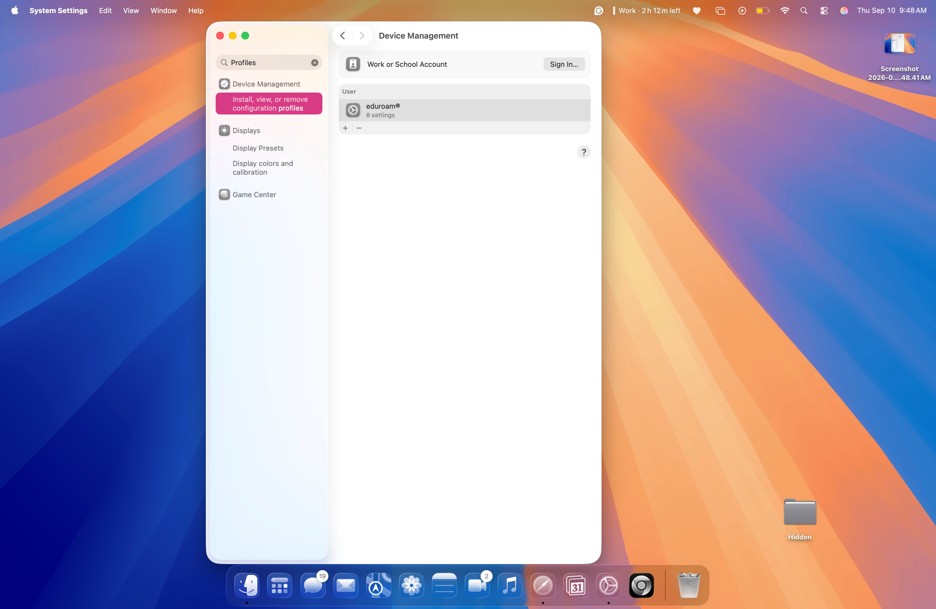
Open settings and search for “Profiles” in the search bar the top lefthand side of the window.
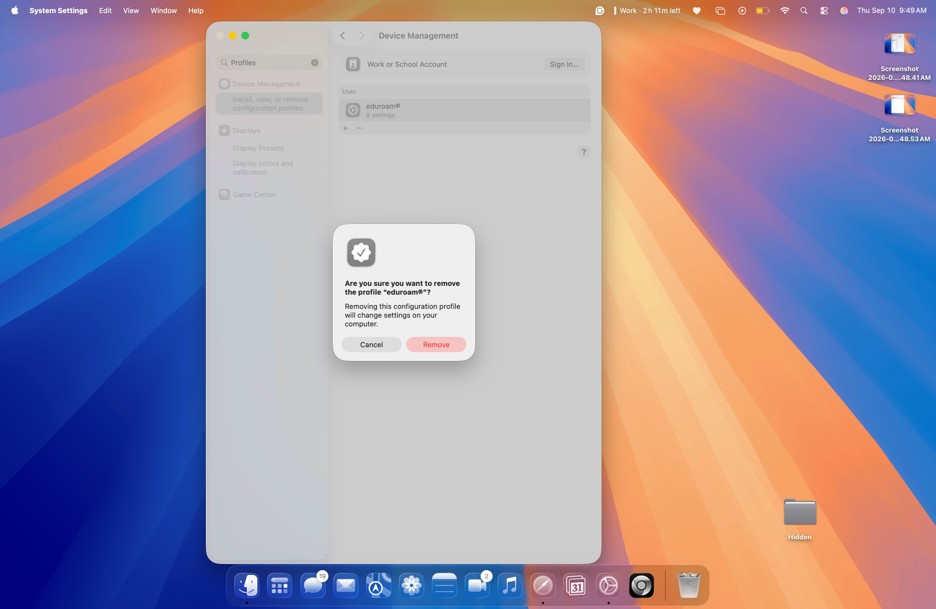
Locate the eduroam profile and click on the Minus (-) sign under the original certificate. A pop-up window will prompt you to approve installation, click “Remove”.
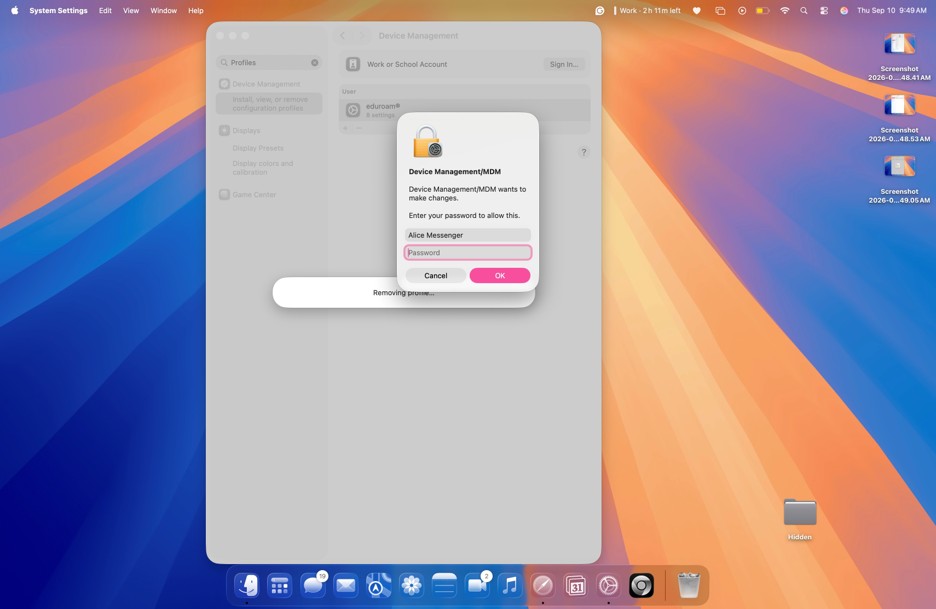
Another pop-up window will prompt you for your iMac Password. Once entered, click “OK”. Now the profile is removed.
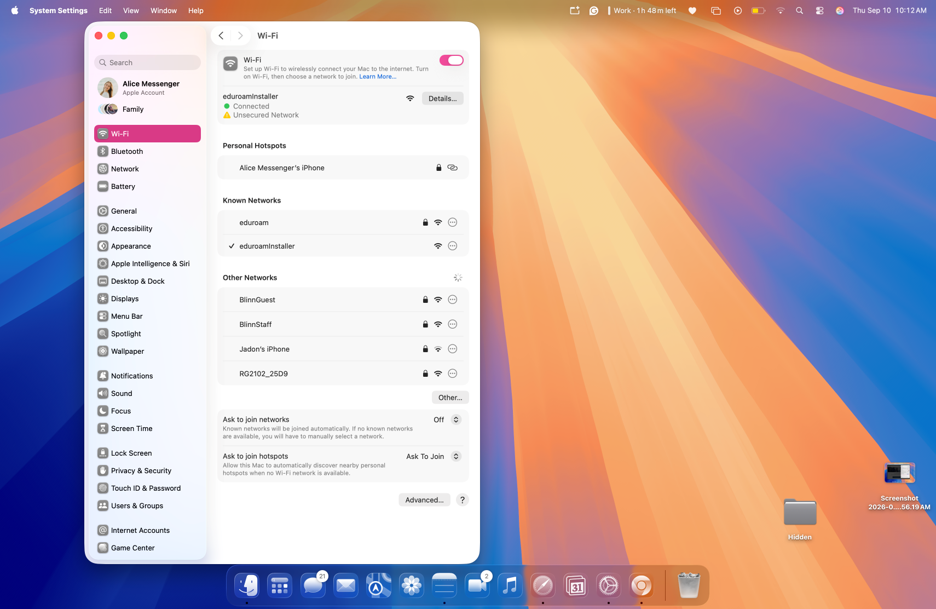
Now, go to your Wi-Fi settings in the Settings app. Connect your device to “eduroaminstaller”.
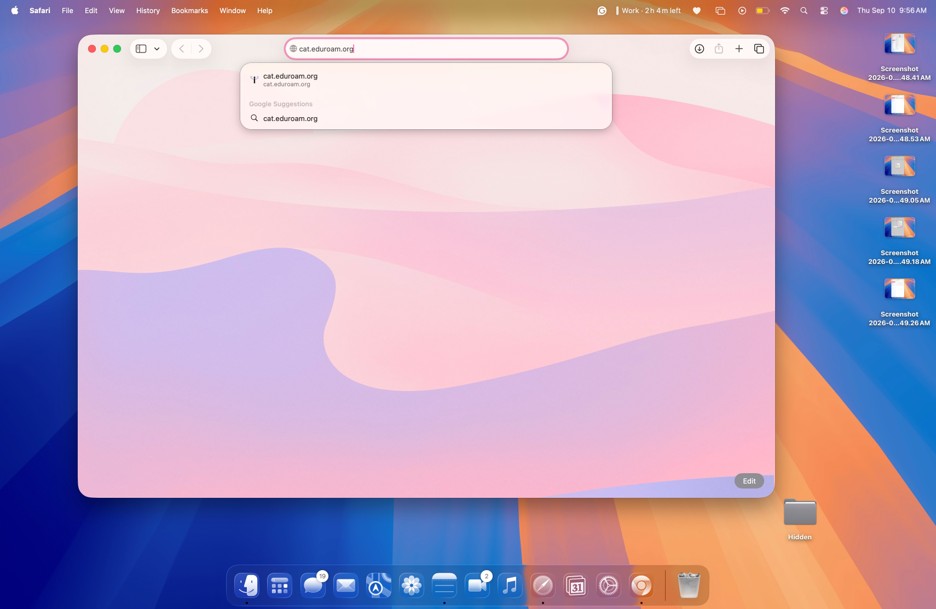
Now, open up the Safari web browser; Chrome will not work. Then type into the search bar, cat.eduroam.org and hit enter.
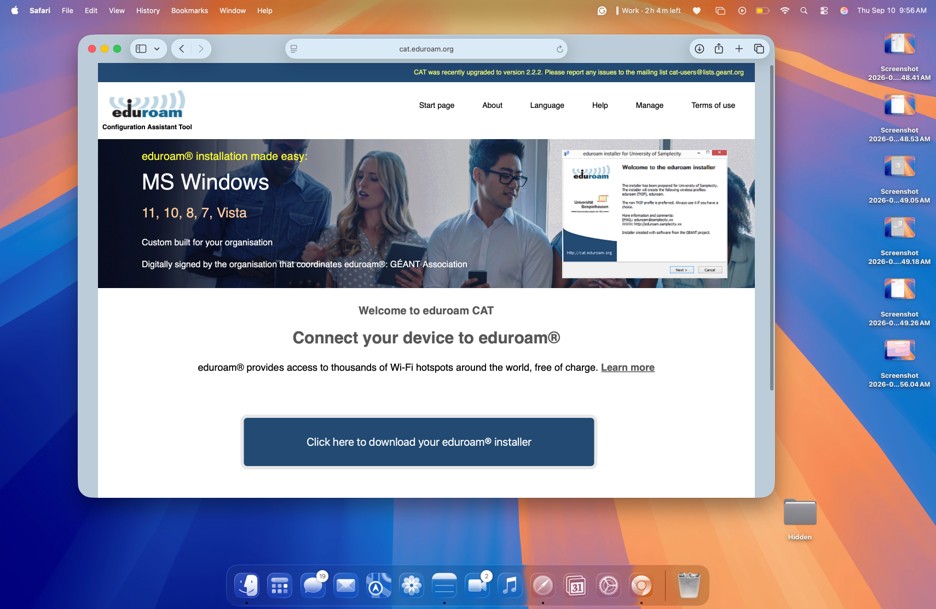
Once the page opens, click on the blue button titled “Click Here to download your eduroam installer”.
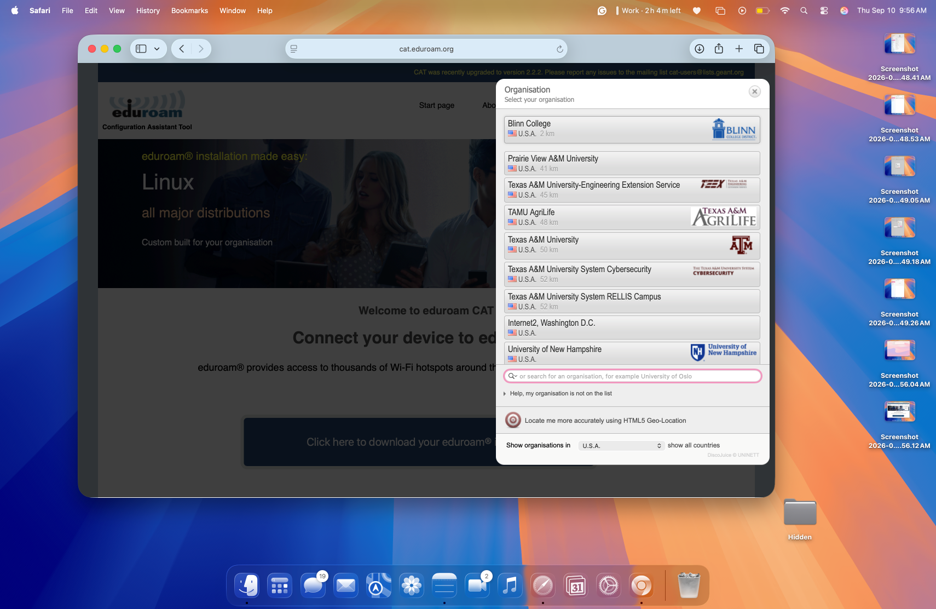
This pop-up window will appear; you will click on Blinn College. Please note, some with a VPN installed may have to use the search bar at the bottom of the pop-up window (as highlighted in red) to find Blinn College.
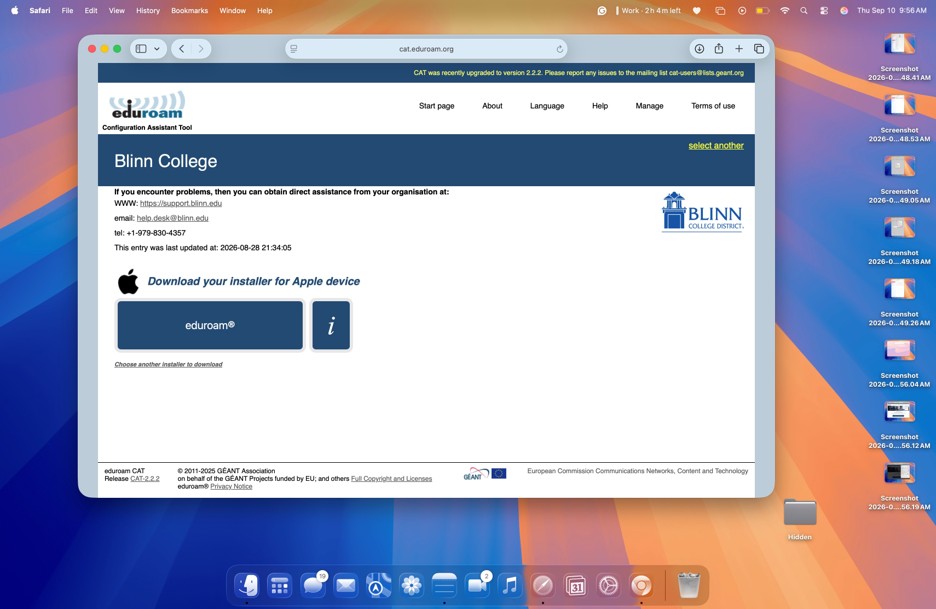
A new page will load with the option to download the installer for eduroam. Click on the blue button titled: eduroam.
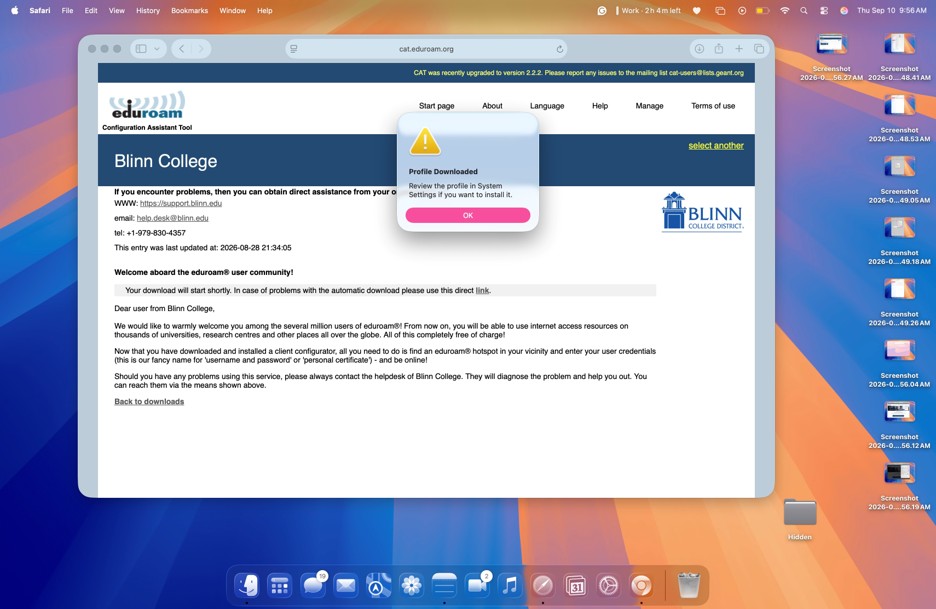
You will receive a pop-up window that notifies you that the profile was downloaded. Please note, some older iMac OS systems will have the user click “Allow on an addition pop-up window. Please approve and click “Allow”.
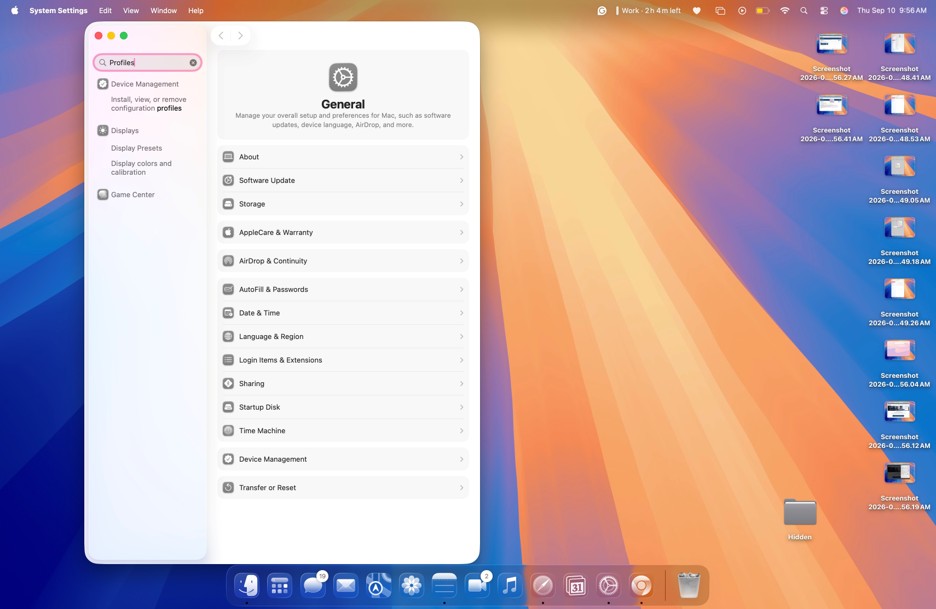
Go back to your settings, and type into the search bar at the top “Profiles”, then hit enter.
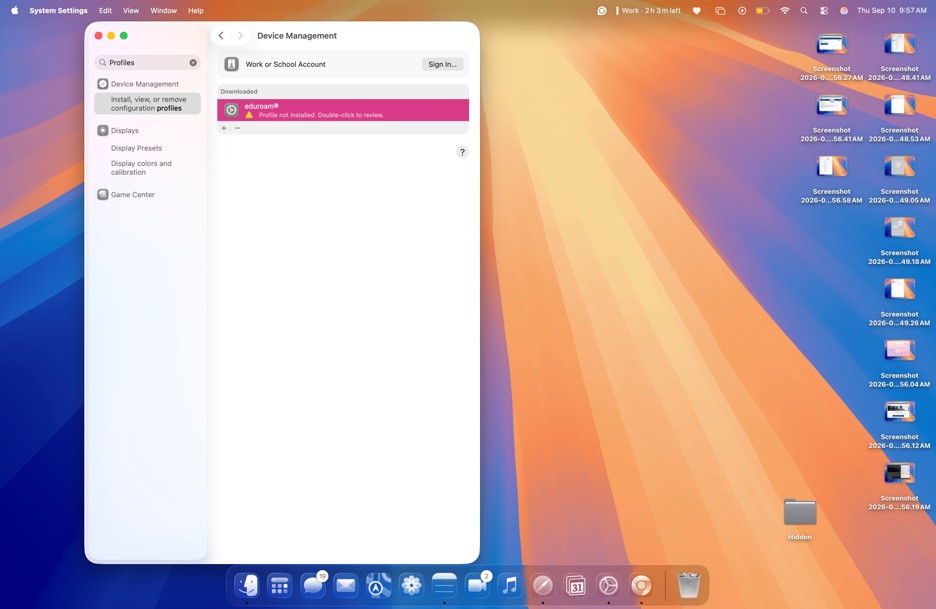
The eduroam certificate has appeared under the downloaded tab, double click to install the network.
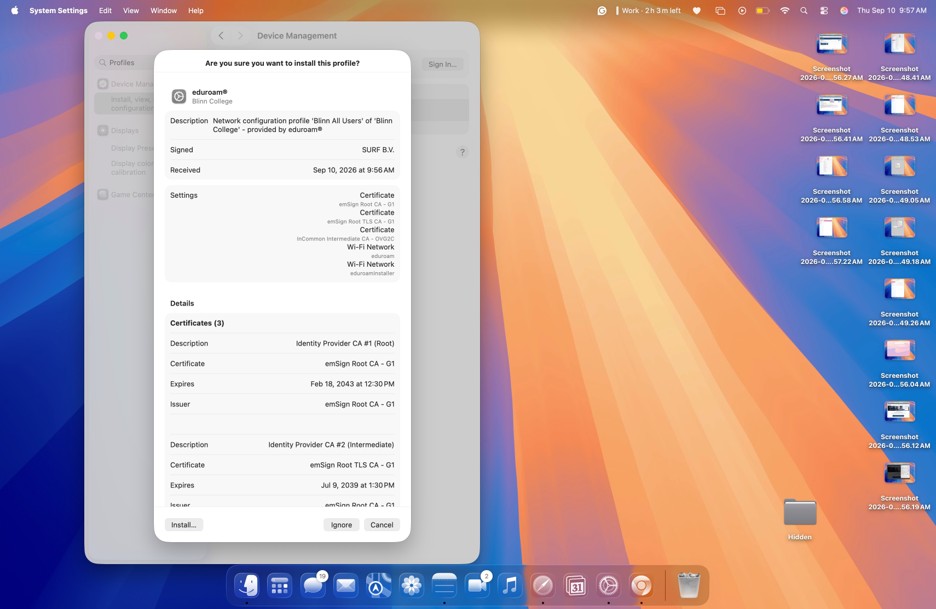
A pop-up window will appear, in the bottom lefthand corner, click Install.
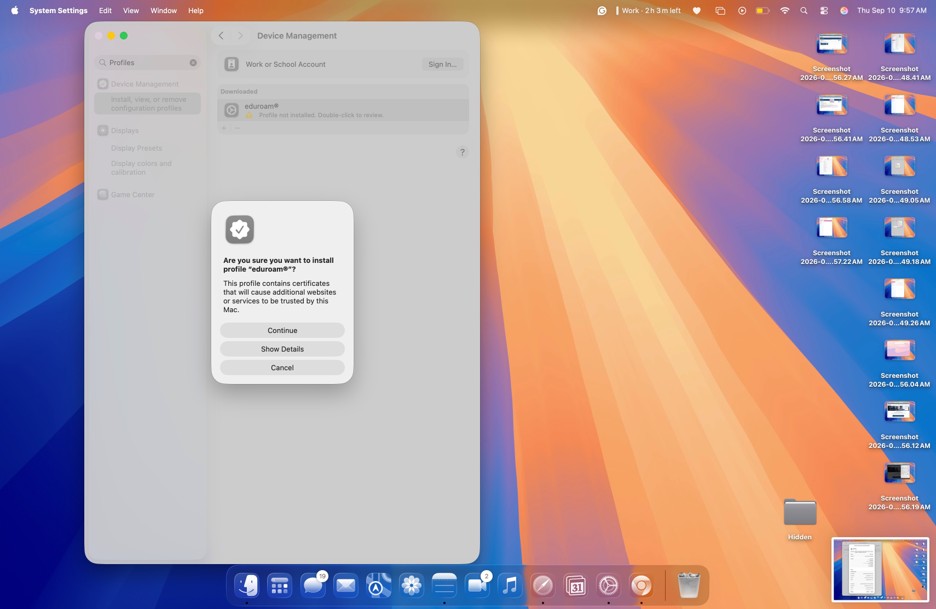
At this pop-up window, click “Continue”.
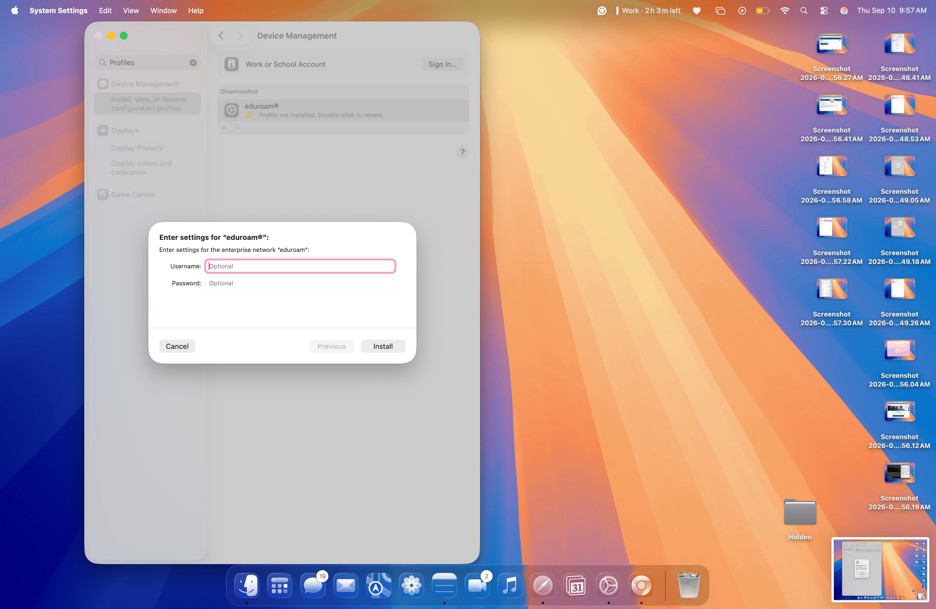
This pop-up window will prompt you for your Username and Password.

Your username is your FULL Blinn email: firstname.lastname##@buc.blinn.edu

NOTE: Ensure that your first and last name is NOT capitalized, and the ## will be the last two numbers of your Blinn ID.

Your Password will be the password you use to sign into MyBlinn.

Please ensure that both the Username and Password are correct; you will not receive an error code if you entered the information incorrect; the Wi-Fi will not work if the information was entered incorrectly.
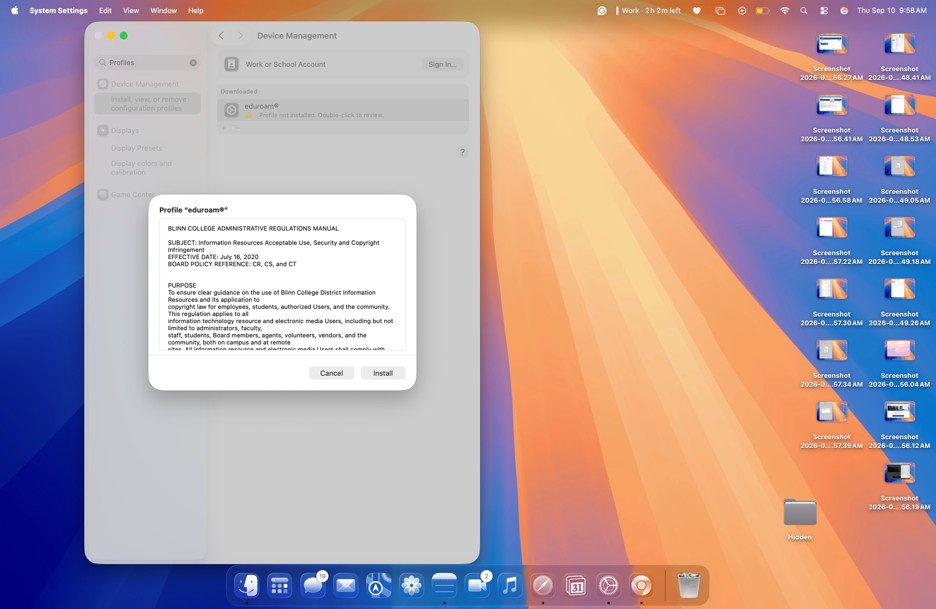
The next pop-up window will ask you to install the certificate, click “Install”.
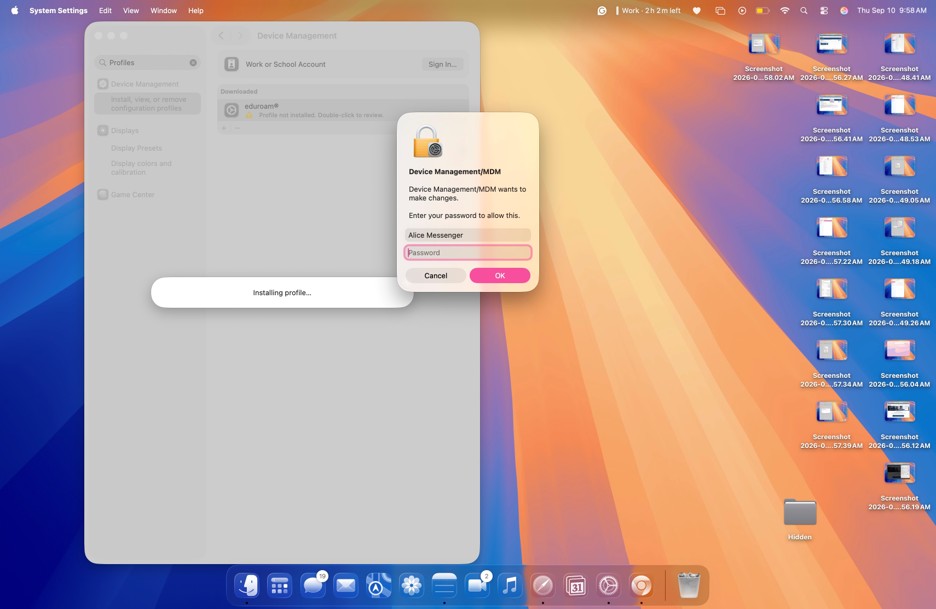
The last pop-up window will prompt you for the Password to your iMac. Once entered, click “OK”.
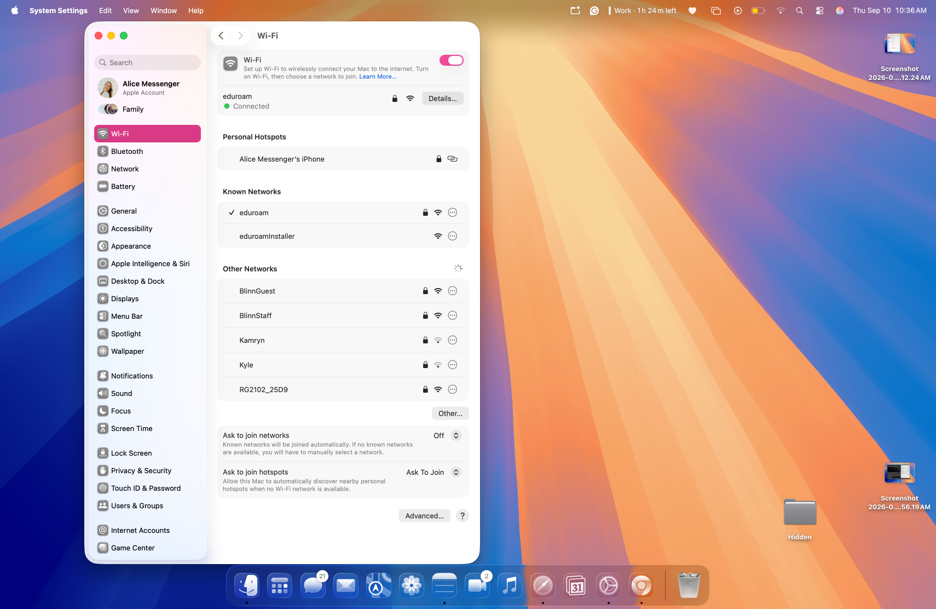
Lastly, go back to your Wi-Fi setting to ensure that your device has connected to eduroam. You will know by the green dot next to the word “Connected”.

Now you are connected to Eduroam.

PROGRAMS
VISIT
APPLY

The Blinn College District is accredited by the Southern Association of Colleges and Schools Commission on Colleges (SACSCOC) to award associate degrees. The Blinn College District also may offer credentials such as certificates and diplomas at approved degree levels. Questions about the accreditation of the Blinn College District may be directed in writing to the Southern Association of Colleges and Schools Commission on Colleges at 1866 Southern Lane, Decatur, GA 30033-4097, by calling (404) 679-4500, or by using information available on SACSCOC's website (www.sacscoc.org).

The Blinn College District does not discriminate on the basis of race, color, national origin, sex, or disability. For information regarding Title IX, ADA, Section 504, and other anti-discrimination coordinators, see the Student Title IX page.

quick links
  • A to Z Index
  • About Blinn College
  • Academic Calendar
  • Blinn Bookstores
  • Campus Maps
  • Choose your Campus
  • Contact Us
  • Directory
  • Employment Opportunities
  • Giving to Blinn
  • Library
  • myBLINN login
  • Social Media
resources
  • Access Syllabi & CVs
  • Curriculum Committee
  • Expressive Activity on Campus
  • Financial Transparency
  • House Bill 2504
  • Mental Health Counseling
  • Online Institutional Resumes
  • Open Records
  • Required Notices
  • State Auditor's Office Fraud, Waste, or Abuse Hotline
  • Student Complaint Forms
  • Student Consumer Information
  • Student Rights and Responsibilities
  • Student Title IX
  • Web Accessibility Statement
safety & security
  • Annual Security Report
  • Blinn Alert
  • Emergency Management
  • Police
  • Privacy Notice
  • Safety & Risk Management

departments
  • Accounting Department
  • Facilities, Planning, and Construction
  • Human Resources
  • Communications, Media Relations, and Marketing
  • Purchasing Department
Administration
  • Administration
  • Board of Trustees
  • Academic Committees
  • Administrative Regulations
  • Advisory Committees
  • Institutional Review Board
  • Legislative Matters
  • Office of Institutional Research and Effectiveness
  • Office of the Chancellor
  • Office of the Executive Vice Chancellor and General Counsel
  • Quality Enhancement Plan
  • Strategic Plan

©2026 Blinn College District | 902 College Avenue | Brenham, TX 77833 | 979-830-4000

Broken Aria Reference