How to Spot Scam Job Offers
Learn how to spot scam job offers: common red flags, fake-check scams, protecting sensitive info, and what to do if you already responded.
November 18, 2026
Throughout the year students may see email or text scam job offers. Sometimes these are from legitimate-looking addresses or phone numbers. Most often, they are scams designed to grab sensitive information or steal money from those simply looking for work.
Here are some actual subject lines seen in job offers emailed to Blinn students:
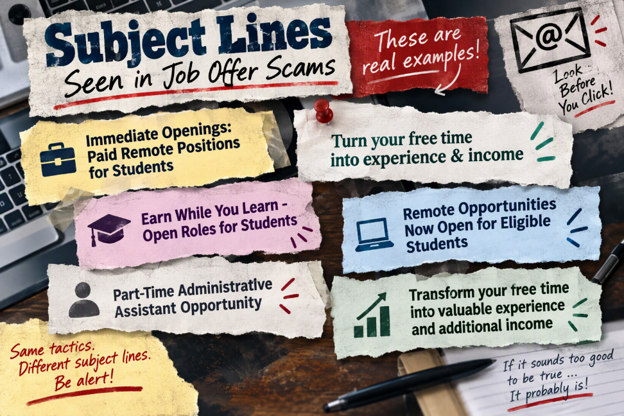
Here are some things to watch out for so you don't get scammed by job offers:
1. Beware of "easy money" jobs
Beware of jobs that look too good to be true, offering high reward for little effort.
Many work-from-home pitches emphasize minimal time required. These often follow the old rule of, "If it sounds too good to be true, it probably is." When you see an unsolicited job offer sent your way that is remarkably lucrative for very little real work, presume it is a scam until proven otherwise.
2. What the bait may look like
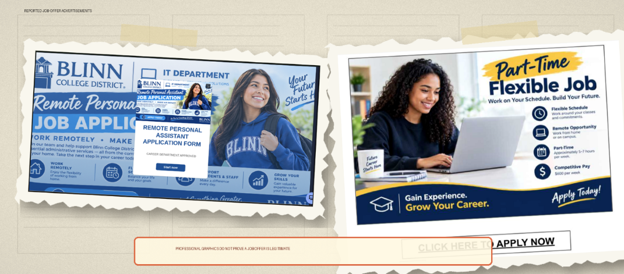
Polished graphics, student-focused language, and promises of flexible remote work. A professional-looking image does not prove that an employer or offer is legitimate, even if it has a Blinn logo in the image:
3. Red flags in the message
- The message originates from a personal Gmail account and not Blinn College (although sometimes student accounts are hacked to send out offers from a legitimate blinn.edu address).
- The subject line promises easy income, immediate openings, flexible remote work, or employment specifically for students.
- The sender moves the conversation to text messaging or conducts the hiring process without a normal interview.
- The sender asks for personal information, banking details, or your bank name before legitimate onboarding.
- You are told to deposit a check and use the money to purchase equipment, pay a third party, or send money elsewhere.
4. Avoid check scams
These may involve a ruse where you deposit a check into your bank account and send a portion to someone else. You supposedly get to keep some money as a fee for the "service." But when the check bounces, you'll have to cover the entire amount, including what you already mailed off along with penalties and fees. A "quick hire" can become a costly fake-check scam.
Important: A check can appear in your account before the bank discovers that it is fake. If you spend or forward the money, you may have to repay it.
How the scam unfolds
-
Email received
Email sent to the student's Blinn account with a link to a form.
-
Form completed
Student submits requested details, including a résumé, phone number, and other personal information.
-
Text contact
The scammer uses the phone number to continue by text message.
-
Fast acceptance
An acceptance or job-offer email arrives with little or no interview.
-
Fake check
The scammer sends a fraudulent check for supposed job expenses.
-
Deposit funds
The student is told to deposit the check.
-
Redirect funds / Overpayment
Scammer says that they "accidentally overpaid" the student, or that the student needs to forward a portion of those funds via Cash App to their "supplier" or "vendor."
-
Insufficient funds
The check bounces, and the student is out the amount sent to the scammer, in addition to purchases made against the check and bank charges.
-
Successful phish
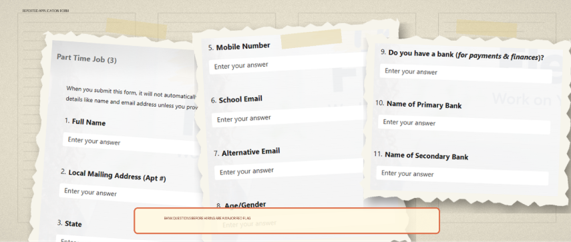
5. Beware of revealing your sensitive information on fake job applications
The application form may collect too much. Requests involving bank relationships are a major warning sign before a verified hiring and payroll process:
Before you respond to a job offer
- Independently visit the employer's official website. Do not use links supplied in the message.
- Contact Blinn College's Career Services or Human Resources Department using a phone number or email address you found independently.
- Do not deposit a check or send money to obtain a job.
- Do not provide bank names, account information, passwords, or multifactor authentication codes in forms.
If you already responded to an offer
- Stop communicating: Do not reply to additional texts or emails, click more links, or send money.
- Preserve evidence: Save screenshots, email headers, text messages, phone numbers, the job posting, the application form, and images of the check.
- Contact your bank: If you deposited the check or disclosed banking information, immediately call the fraud number printed on the back of your bank card or shown in the bank's official app or website.
- Secure your accounts: Change any reused passwords and review multifactor authentication methods and recent sign-ins.
- Report the incident: Submit a support ticket by going to support.blinn.edu.
Remember
A legitimate employer pays you for your work. It should not require you to deposit a stranger's check, buy equipment from a designated vendor, or send money in order to get interviewed or hired.
When in doubt: Stop • Verify • Report
Enjoy this article? Share it with one click!